For online shops, SMEs and agencies
Analyse your website’s accessibility and find out what you can improve
Detect accessibility barriers, understand what to fix first and get recommendations to improve your website with WCAG 2.2 and the European Accessibility Act.
Automated tests based on WCAG 2.2, levels A and AA.
Reference legislation: Law 11/2023 (European Accessibility Act).
The recommendations for fixing issues are in the full platform.
Create a free account to see them.
Example scan in SiteNorma
A real walkthrough of the dashboard: the scan, one issue and checking the fix.
Real recording of the dashboard using a demo website. It shows example results, not a scan of your website. No audio; the step-by-step detail is in writing under “See how it works”.

SiteNorma for your organisation
-
For online shops

Identify barriers that can make it harder to browse products and complete a purchase.
-
For SMEs

Understand what your website needs to improve and share the issues with your team or supplier.
-
For agencies

Build accessibility analysis into the review and maintenance of your clients’ websites.
How it works
Improve your website’s accessibility step by step
Analyse your website, identify what you can improve and track the changes from one place.
-

Add your website
Enter the address of the page you want to analyse and add it to SiteNorma to get started.
-

Analyse your pages
Start the analysis and follow its progress while SiteNorma reviews your website’s pages.
-

Review the results
See the problems found, the elements affected and the pages that need improvements.
-

Understand and fix the problems
Find the affected elements and use the recommendations to apply the fixes on your website.
-

Complete the manual review
Also review the aspects that cannot be checked automatically for a fuller view of your website’s accessibility.
-

Check and follow up
After fixing, analyse the pages again and see the status of the fixes in the follow-up section.
SiteNorma helps you find and organise the improvements. You or your team apply the fixes. The automatic estimate is not a full accessibility check and does not guarantee legal conformity. Running an analysis again counts towards your plan’s limit.
A real example
We follow a single issue on a demo website, from detection through to checking the fix.
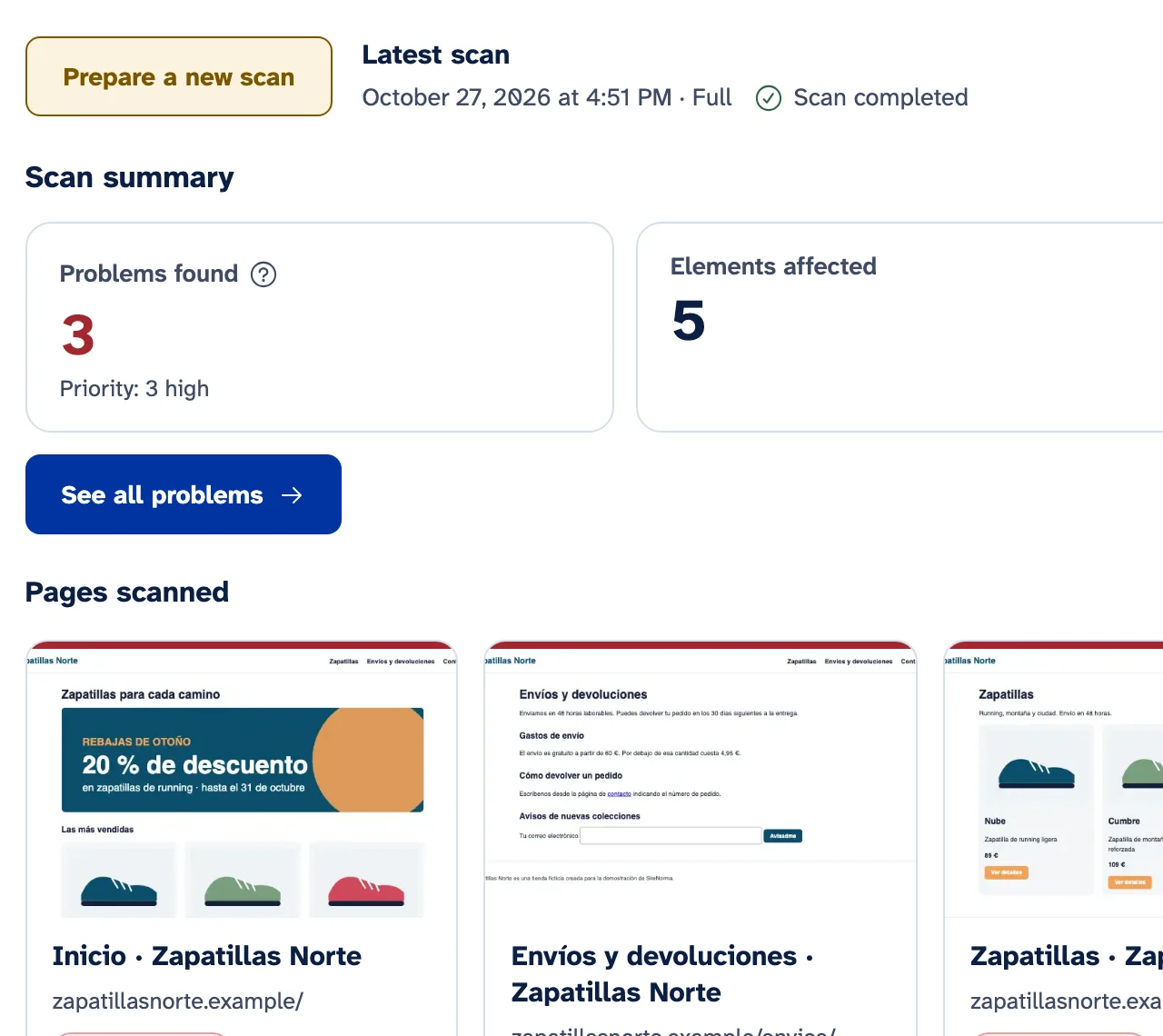
Example scan in SiteNorma
- Demonstration website
- Zapatillas Norte (fictitious)
- Date of the scan
In this example the scan covers 4 pages and finds 3 problems. The full three-step walkthrough, with dashboard screenshots, is on the demo page.
Automated analysis identifies some of the barriers. It must be complemented by a manual review. How we calculate the estimate.
Built on the standard, not on promises
These figures come from SiteNorma’s catalogue and engine. Automated analysis finds failures; it does not declare conformity.
-
56
WCAG 2.2 A and AA criteria
Full catalogue of WCAG 2.2 Level A and AA success criteria.
-
97
Detection rules
Engine rules that find failures on every page analysed.
-
2
Devices per page
Every page is analysed on desktop and mobile. The dashboard is in four languages.
Understand what we analyse and how we interpret the results
Read our methodology, explore a sample report and find out which checks need a manual review.
-
How we analyse your website
The scanning procedure, the automated checks, the manual review and how the score is calculated.
-
See a sample report
An illustrative scan, with its date, sample figures and issues by severity.
-
Criteria and regulations
The references we rely on, the scope of the analysis and what it cannot tell you.
Questions about SiteNorma?
Everything you need in one place
Analyse accessibility, organise the review and prepare reports and documents. Performance and the Accessibility Centre are planned for a later release.
-
Accessibility
Automated tests based on WCAG 2.2, levels A and AA, on desktop and mobile. Issues sorted by severity, template and owner.
Learn more about Accessibility -
Regulatory compliance
A regulatory profile for each website, an EN 301 549 criteria matrix and guided manual review.
Learn more about Regulatory compliance -
Legal documents
Accessibility information for your service, an accessibility statement and a disproportionate burden template.
Learn more about Legal documents -
Inspector and AI
A screenshot with the element highlighted, its code and an AI-suggested fix that you always review yourself.
Learn more about Inspector and AI -
MCP for agents
Connect Cursor or another agent: it reads your analyses and applies fixes in local code. You publish the changes.
Learn more about MCP for agents -
SEO and quality
Titles, broken links, canonical tags, mixed content, JavaScript errors and cookies set before consent.
Learn more about SEO and quality -
Reports
A PDF accessibility and compliance report, and an XLSX export of every issue.
Learn more about Reports -
Coming soon
Performance and uptime
Loading speed metrics, real user data and an alert when your website stops responding.
Learn more about Performance and uptime -
Coming soon
Accessibility Centre
A small panel for your website with your statement, a feedback form and three preferences. It is not an overlay.
Learn more about Accessibility Centre
The regulations, explained without jargon
Since 28 June 2025, Law 11/2023, which transposes the European Accessibility Act (EAA), has required many websites and apps for consumer services to be accessible. It covers e-commerce, banking and passenger transport, among others, and in Spain it also covers electricity, water and gas suppliers, travel agencies and social networks.
Microenterprises that provide services are exempt. If you are not sure whether it applies to you, answer four questions and find out.
Key dates
- The requirements of the European Accessibility Act start to apply (in Spain, Law 11/2023).
- ETSI publishes the EN 301 549 v4.1.1 standard, based on WCAG 2.2.
- Fourth quarter of 2026 (expected) Citation of v4.1.1 in the Official Journal of the European Union.
- End of the transitional period for services provided with products that were already in use before 2025.
Automated testing is not enough. And we tell you so.
Automated tools detect only some accessibility barriers. According to published studies, between 14% and 57%, depending on the tool and how barriers are counted. The rest need a person.
Today the score reflects the automated tests. Manual review records results per criterion and is shown separately; when it feeds the score, it will make up 40% and, until you have reviewed at least 80% of the criteria, you will see “Manual review pending” instead of a final rating.
The score is an estimate. Conformance requires evaluating the applicable criteria and completing the manual review.
What automated tests detect
- Images without alternative text.
- Insufficient contrast between text and background.
- Form fields without a label.
- Buttons and links without an accessible name.
- Pages with no declared language.
- Content that does not reflow at a width of 320 pixels.
What needs a manual review
- Whether the alternative text describes the image well.
- Whether the reading and focus order makes sense.
- Whether error messages help people fix the problem.
- Whether video captions are accurate.
- Whether you can complete a purchase from start to finish using only a keyboard.
Clear pricing, based on scanned pages
Prices excluding VAT. The annual plan is equivalent to 2 months free. Each analysed URL counts as one page (desktop and mobile included); analysing it again uses quota again.
-
Free
€0
10 scanned pages a month and 1 website. Quick accessibility scan.
-
Pro
€39 a month
1,000 scanned pages a month, unlimited websites and users, compliance, legal documents and AI. Try it for 14 days with no card.
-
Agency
€99 a month
5,000 scanned pages a month, daily scans, reports with your agency’s branding (without SiteNorma), read-only access and scheduled reports for your clients.
-
Custom
from €249 a month
20,000 scanned pages a month or more, with terms tailored to your organisation.
Frequently asked questions
What is the European Accessibility Act?
It is Directive (EU) 2019/882, which sets accessibility requirements for certain products and services. In Spain it is transposed by Law 11/2023 and has applied since 28 June 2025. For websites and apps, the usual technical reference is the EN 301 549 standard, which refers to the WCAG guidelines.
Does it apply to me if I have a small online shop?
It depends. E-commerce aimed at consumers is included, but microenterprises that provide services are exempt: fewer than 10 people and an annual turnover or balance sheet total of €2 million or less. Find out with Does the EAA apply to me?
Does SiteNorma make my website comply with the law?
Not on its own, and be wary of anyone who promises that. SiteNorma detects barriers, helps you prioritise and fix them, guides you through the manual review and helps you document the result. Compliance depends on the fixes you make to your website.
What do you do with my website’s data?
We analyse public pages with the SiteNorma crawler, which respects your robots.txt. We store the results so you can see how your website evolves. This website only uses analytics cookies if you accept them. You will find more information in our privacy policy.
Start using SiteNorma
Create your account and start improving your website’s accessibility. The Free plan includes 10 scanned pages a month, with no card required.